
How It Works
Four parts, one of which is new. Here is exactly what gets added to your site and what crosses the boundary.
Four parts, one system
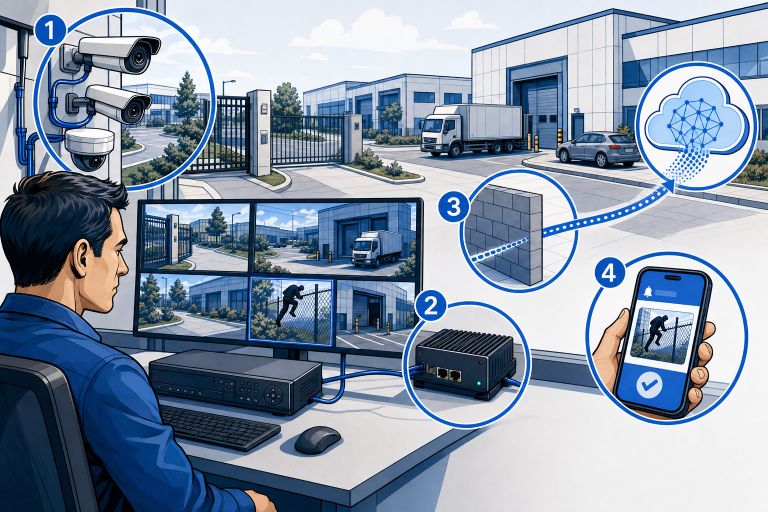
SmartGard.AI has four moving parts, and you already own two of them.
- Your cameras. Unchanged. They keep recording to wherever they record today.
- An edge device on your network. This is the one new piece of equipment. A small computer that sits on the same network as your cameras.
- The SmartGard.AI cloud. Where the analysis happens and where your site’s configuration lives. Hosted on Microsoft Azure.
- Your phone. Where alerts arrive, where you order a patrol, where you read reports.
The same four parts serve both halves of the product. What differs is who starts the exchange.
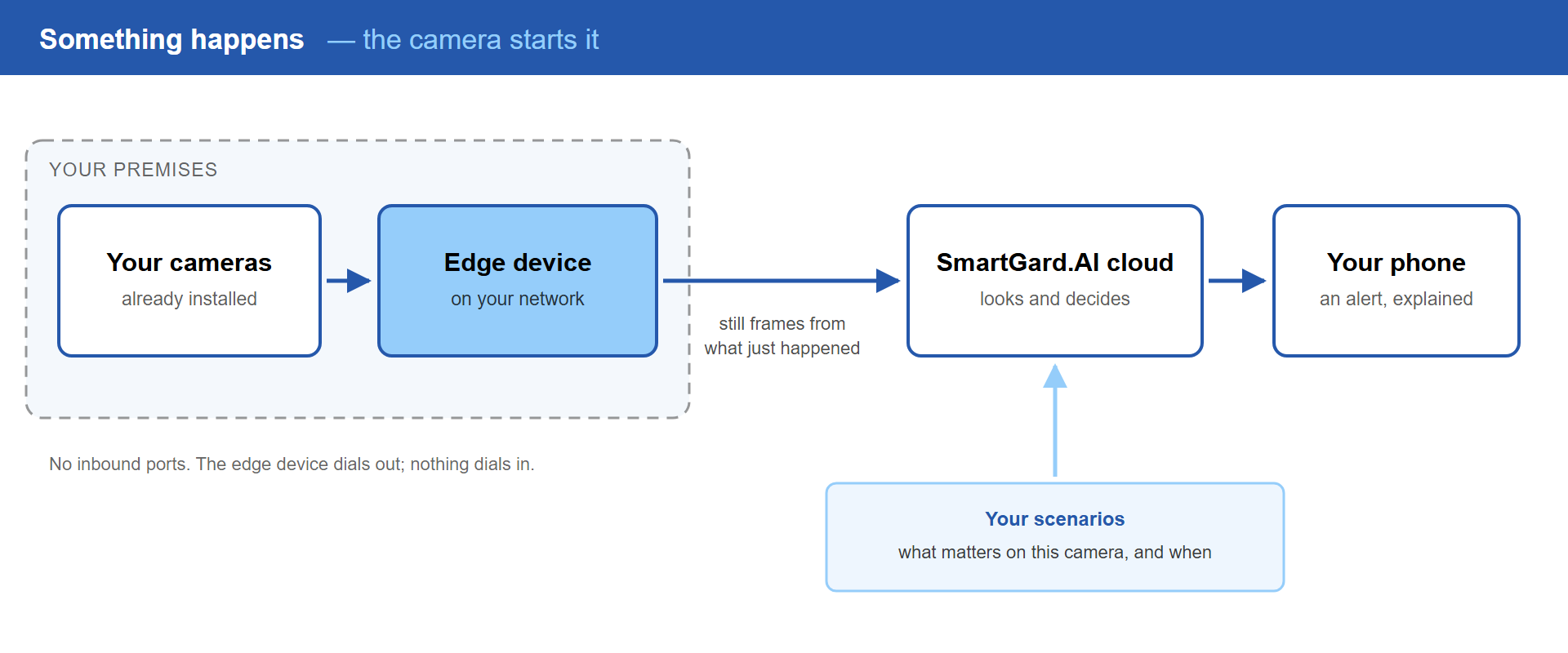
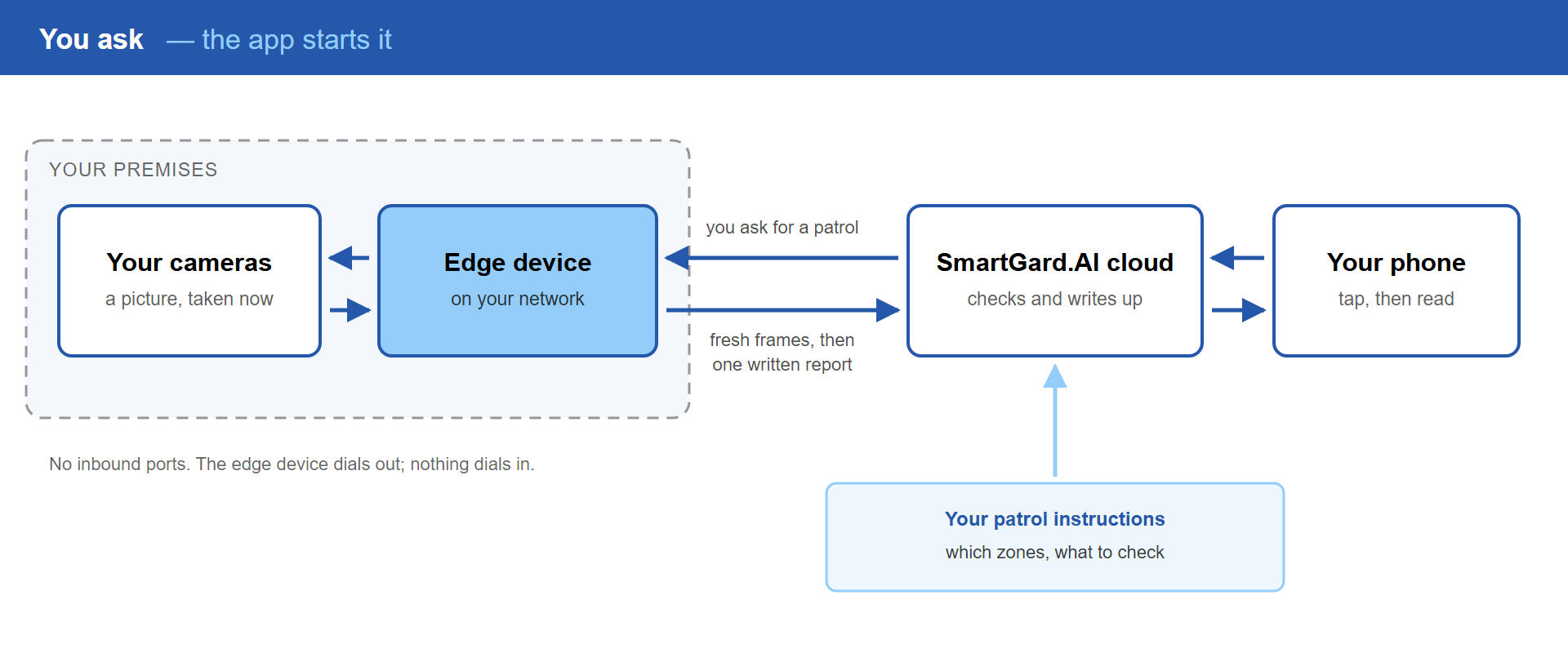
Click either diagram to enlarge
The edge device, and why it exists
Almost every question people ask about deployment is really a question about this box, so it is worth being direct about what it does.
It talks to your cameras locally. It receives what they report and, when asked, takes a fresh picture from them. All of that traffic stays inside your network.
It sends still images, not video. A handful of frames around an actual event, or one frame per camera when a patrol runs. Not a continuous feed of everything the cameras see all day.
It dials outward. The connection is always made from your site to the cloud, never the other way round. That is the reason nothing needs opening in your firewall – no port forwarding, no static IP, no inbound rule for someone to worry about at your next security review.
It can blur faces and licence plates before anything leaves the building, if you switch that on. The analysis still works – the AI can tell that a person is climbing a fence without processing who they are.
And it reports its own health, so you can see it is alive and ping it from the app rather than discovering months later that it stopped talking.
What actually leaves your site
Worth stating plainly, because this is usually the question behind the question.
Leaves your premises: still images from actual events or patrol stops, and the written analysis that comes back from them.
Stays on your premises: your continuous video, your recordings, your recorder. SmartGard.AI does not stream your cameras to the cloud and does not copy your archive anywhere.
One honest caveat: the written analysis describes what the AI saw, and that description can include things like what a person was wearing. Blurring covers the images, not the words. The full picture on privacy →
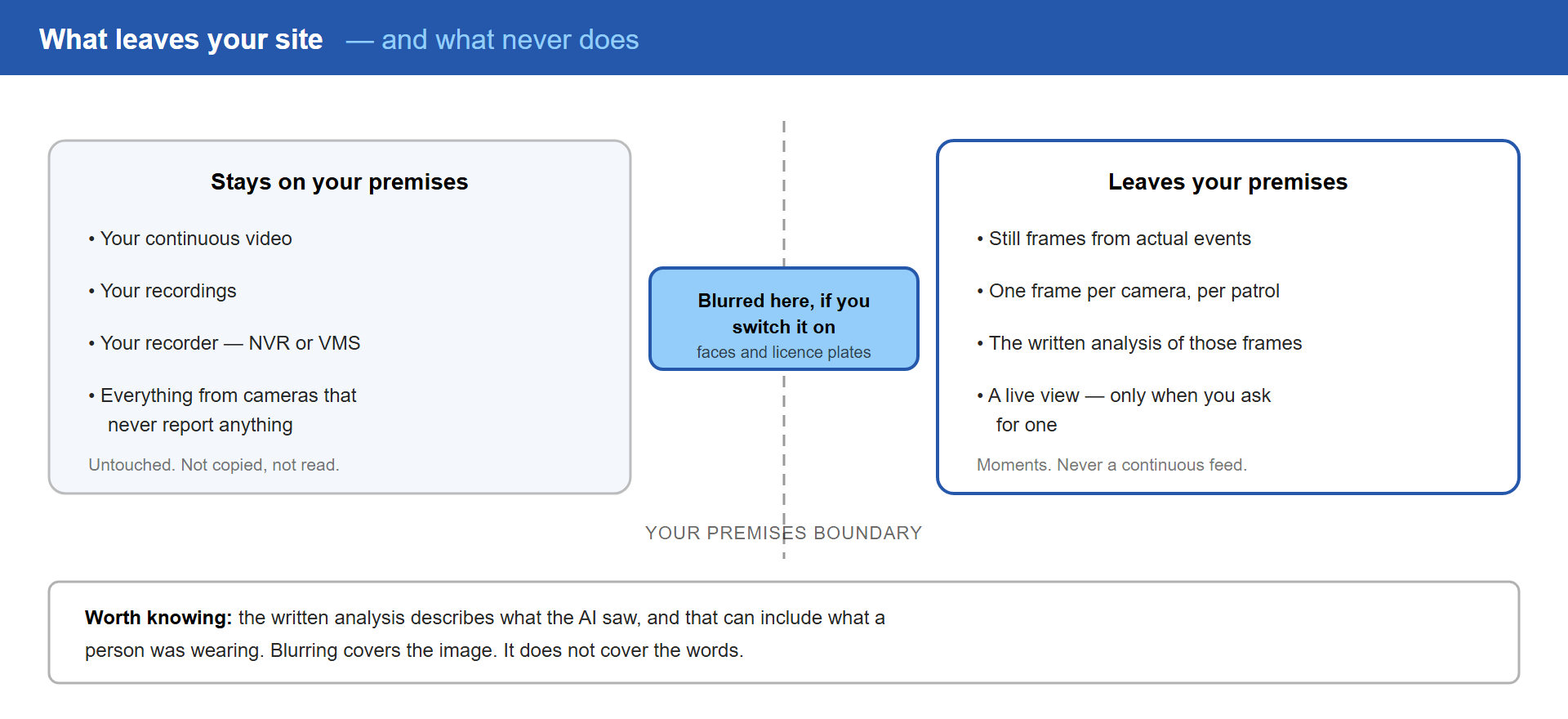
Click the diagram to enlarge
Moments, not hours – and why that is what makes it affordable
There are two ways to put AI behind a camera, and they differ by orders of magnitude in cost.
The brute-force approach is to analyse the stream – push every second of every camera through AI, around the clock. It sounds thorough until you consider what surveillance footage actually contains: hours of an empty car park, a still warehouse, a closed gate. Continuous analysis means paying premium compute, all night, to confirm that nothing is happening. At that price, corners get cut quietly – smaller models, lower resolution, fewer cameras covered.
SmartGard.AI works the way attention actually works. Your cameras’ own detection and your patrol schedule decide when to look; the AI then examines a handful of high-quality frames from exactly that moment, with your site’s context attached. A good guard does not stare at a frozen picture of an empty yard for eight hours. They look up when something moves, and then they look carefully.
| Continuous stream analysis | SmartGard.AI — frame analysis | |
|---|---|---|
| What you pay for | every second, mostly of nothing | the moments something happens |
| AI quality at a workable price | cut-down models, or a punishing bill | top-tier vision models on every analysis |
| What leaves your site | constant video upload, around the clock | a few frames per event or patrol stop |
| Cost scales with | cameras × hours | activity on your site |
| A quiet night costs | as much as a busy one | next to nothing |
That is why SmartGard.AI can afford to be careful: it is not burning budget on empty hours. It is also why a site with many quiet cameras is not punished for owning them.
What you need
A short checklist. Most sites tick the first two already.
- IP cameras that can report events – through an HTTP alarm host, ONVIF events, or the manufacturer’s own SDK. Cameras connect through an edge adapter, so the platform is not tied to a single brand. If you are not sure what yours can do, an audit answers it in a morning.
- A place to put the edge device on the camera network, with power.
- An outbound internet connection.
And a list of things you explicitly do not need: new cameras, a new recorder, new cabling, a static IP address, an open port, or a contract with a monitoring centre.
What happens in the cloud
Four steps, every time.
The images are prepared. Frames are corrected for exposure and contrast and sized for analysis. A poor picture produces a poor judgement, so this happens before anything else.
The AI is asked a question shaped by your site. Not “is there anything in this image”, but a question built from what you told the system: this zone is a fuel depot, it should be empty after six, here is what normal looks like, here is what you asked to be told about.
The answer is checked against your rules. The model returns what it saw and whether your conditions are met. Only then does anything become an alarm – or, in a patrol, a finding in the report.
You are told, or you are not. An alert with a written explanation and the images, or a quiet entry in your site’s history that you can search later.
Live view, on demand
One tap gives you a live frame or a live stream from any camera, wherever you are.
Those links are signed and short-lived – minutes, not for ever. There is no permanent web address for one of your cameras sitting around waiting to be forwarded to the wrong person or picked up by a search engine. When a link expires, the app simply asks for a fresh one.
Still no open ports. The stream is relayed through the connection the edge device already opened outward.
What happens when something fails
Things fail. The useful question is what the system does about it.
If an AI provider has an outage. Every analysis has a backup model from a different vendor. One AI company having a bad day does not leave your site unwatched.
If a camera stops responding. During a patrol it is tried twice by two different routes, and if it still will not answer it is reported as an issue rather than skipped. Silence is treated as a finding.
If the edge device stops. It reports its own status and can be pinged from the app, so a dead box is something you are told about rather than something you discover after an incident.
If your internet drops. Analysis needs the connection – that is honest and unavoidable for a cloud service. Your cameras keep recording locally throughout, exactly as they do today, and the edge device reconnects on its own when the line comes back.
Frequently asked questions
Do we have to replace our VMS or NVR?
No. SmartGard.AI runs alongside it. Your recorder keeps recording, your retention policy is unchanged, and your recordings stay where they are. SmartGard.AI does not read from your recorder and does not try to replace it.
Do you open ports in our firewall?
No. The edge device makes an outbound connection and everything travels over that. There is no inbound rule, no port forwarding, and no static IP required.
Do you store our video?
No. Still frames from actual events and patrol stops, plus the analysis results. Not your recordings, and not a continuous feed.
What if our internet connection drops?
Cameras keep recording locally. Analysis pauses, because it happens in the cloud. The edge device reconnects by itself when the connection returns.
What if a camera dies?
A patrol reports it as an issue on the next round. That is one of the quieter benefits of running regular patrols – camera failures surface as a routine finding rather than as an unpleasant discovery when you need the footage.
How many cameras can it handle?
The analysis scales per site and per event rather than running continuously, so adding cameras adds cost only when those cameras actually report something. A site with forty mostly-quiet cameras is not forty times the cost of a site with one busy one.