
Adding SmartGard.AI to Your Existing CCTV
You already bought the cameras. This adds the guard behind them.
Keep your cameras. Add the guard.
If your CCTV is already installed, working, and paid for, the last thing you want to hear is that you need a new system.
You do not. SmartGard.AI is designed to be fitted on top of cameras that are already up. Your existing equipment carries on doing exactly what it does; what gets added is the judgement layer that was never there.
The honest version: this works for most modern IP installations and not for all of them. Which is why the first step is looking rather than promising.
What stays exactly as it is
- Your cameras. Where they are, pointed where they point.
- Your recorder. Your NVR or VMS keeps recording, on your retention policy. SmartGard.AI does not read from it, replace it, or interfere with it.
- Your recordings. They stay yours, in the same place, under the same rules.
- How your team already views footage. Nobody has to learn a new way to do the thing they already do.
What gets added
- An edge device on your camera network. One small piece of equipment. It talks to the cameras locally and dials outward, so no ports are opened in your firewall.
- Your site’s configuration. Zones described in your words, rules written for the cameras that need them, patrol routes if you want them.
- The app, for alerts, live view, patrol reports and history.
That is the whole footprint. No new cabling to your cameras, no new recorder, no rack. How it works, in detail →
We look before we promise
Every retrofit starts with an audit of what you actually have – not a form you fill in, an engineer looking at the system.
What we are establishing: which cameras can report events and by what method, whether the network can carry an outbound connection, where the edge device should sit, and which zones are worth covering first. That last one matters more than people expect. A site rarely needs every camera analysed; it needs the right ones.
You get a straight answer about what will work, what will not, and what it would take to change the second category into the first.
Our existing CCTV system audit →
What can stand in the way
Three things come up, and it is better to know about them before a contract than after.
Cameras that cannot report events. SmartGard.AI is triggered by a camera telling it something happened. Cameras with no event-reporting capability at all have nothing to trigger it with. Some can be brought into scope by other means; some cannot, and those are honestly better replaced than worked around.
Analogue installations. Older analogue systems without IP capability are not candidates for a retrofit. If that is what you have, the conversation is about modernisation rather than about adding a layer to it.
Networks with no outbound path. Genuinely isolated camera networks need a route out before anything can be sent for analysis. That is usually a small piece of work rather than an obstacle – but it is work, and it should be in the quote rather than in a surprise.
None of these is a reason for a supplier to be vague. If your site has one of them you will be told during the audit, not discovered halfway through an installation.
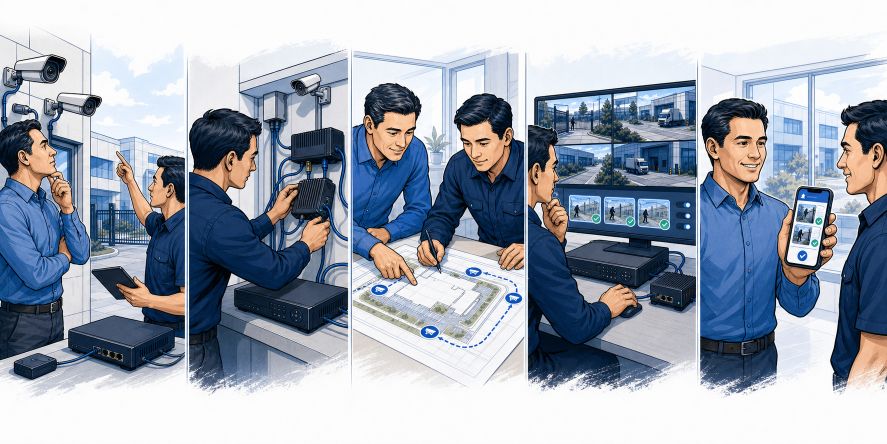
How a typical retrofit runs
1. Audit
An engineer establishes what your system can do and what is worth covering.
2. Installation
The edge device goes in and is connected to the cameras. This is a short visit, not a project.
3. Briefing
The part that determines how well the system performs. Zones get described, the site context gets written down, rules get set for the cameras that need them. An assistant drafts most of this from plain-language descriptions; you correct it where it is wrong.
4. Tuning
The first stretch of real events, reviewed. Rules get tightened where they are noisy and loosened where they are too quiet. Any rule can be tested against your own historical events before it goes live, which makes this considerably faster than it sounds.
5. Handover
You run it. We stay available.
How it is charged
Two elements, and neither is a surprise.
There is a one-off for the audit, the edge device, the installation visit, and the initial configuration. It is quoted after the audit, when we know what your site actually needs.
Then there is an ongoing element that follows usage, because analysis is metered per site. It scales with how much your cameras actually report and how often you run patrols – not with how many cameras you happen to own. A site with many quiet cameras is not punished for owning them, and a quiet night costs almost nothing. Balances and per-camera breakdowns are visible in the app, so the figure is never a mystery at the end of the month.
Frequently asked questions
Will this work with my cameras?
If they are IP cameras that can report events, very probably. The audit gives you a definite answer rather than a hopeful one, and it is worth doing before you plan anything around it.
Do I need to replace my NVR?
No. SmartGard.AI works alongside it and does not read from it.
How long does it take?
The audit is quick. Installation is a visit. The briefing and tuning stretch over the following weeks, because that part improves with real events – a system that has seen a fortnight of your site is noticeably better than one that has seen a day.
Can we trial it on a few cameras first?
Yes, and it is the usual way in. Start with the zones that cause the most trouble – the back gate, the yard, the loading bay – see how it behaves on real events, and extend from there.
What if we later replace the cameras?
The configuration follows the site, not the hardware. New cameras are added to the existing zones and rules rather than starting again.
We are also considering a full upgrade. Does that change anything?
It makes things easier, not harder. If cameras are being replaced anyway, they can be chosen and positioned with the analysis in mind from the start. See our installation and upgrade services →