
Privacy
What leaves your site, what stays on it, and what the system never does at all.
Privacy is a design question
You can bolt a privacy policy onto anything. What you cannot bolt on is an architecture that sends less in the first place.
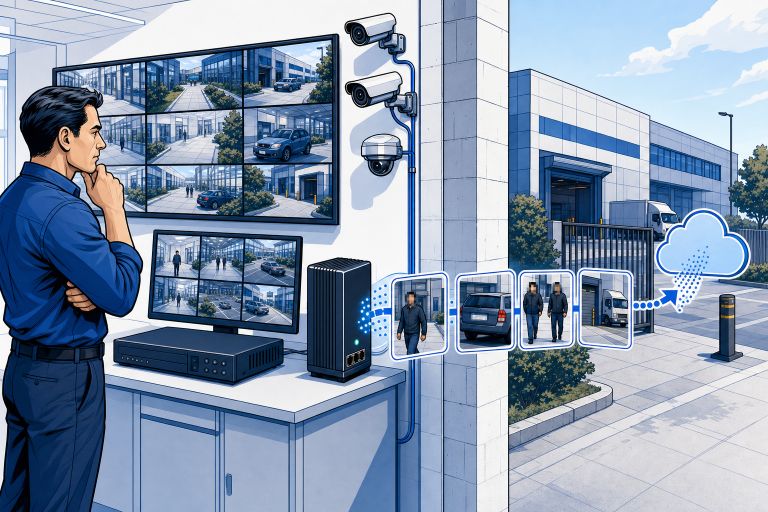
SmartGard.AI was built to look at moments rather than to watch continuously, and most of what follows on this page is a consequence of that one decision rather than a promise layered on top of it. Here is what the system sends, what it keeps, and what it does not do at all.
Anonymisation before anything leaves your site
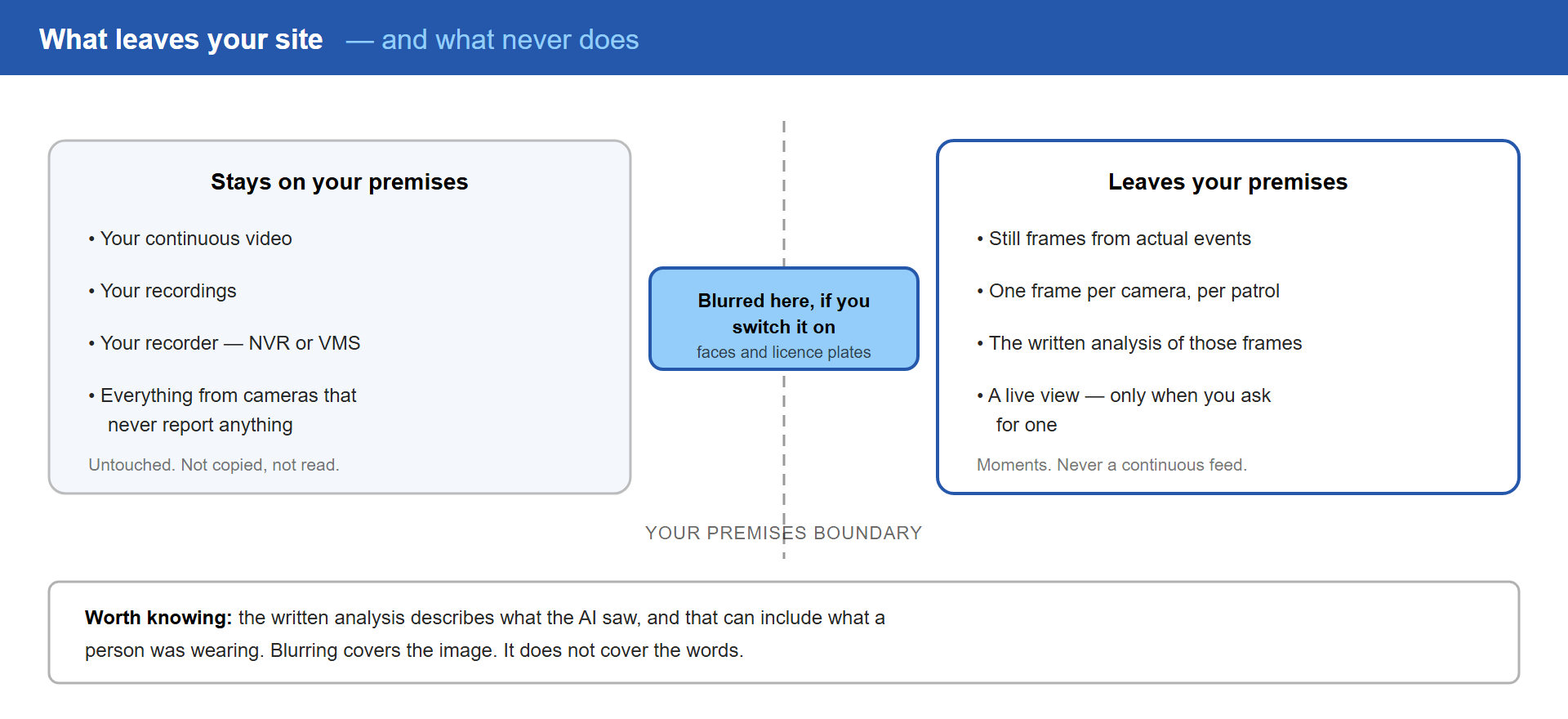
The edge device on your premises can blur faces and licence plates before an image is sent anywhere at all. The blurring happens on your network, on your hardware, while the picture is still inside the building.
The analysis still works. The AI can establish that a person is climbing a fence, that a vehicle is parked where nothing should be parked, or that a door is standing open, without processing an identifiable face.
Two things worth being precise about.
It is a setting you choose, per site. It is not simply on by default, and that is deliberate: some sites want it everywhere, others need identifiable images for a specific and legitimate reason, and that decision belongs to you rather than to us. It is also reversible – turn it on, turn it off, change your mind.
And it covers faces and licence plates. It is not a general blurring of everything a frame happens to contain.
What the analysis produces, and what that means
Most suppliers leave this part out. We would rather you heard it here.
The AI does not return a simple yes or no. It writes a description of what it saw, and that description can mention things like what a person was wearing or roughly how they were built, because that is what makes an alert useful – “a person in a hi-vis jacket at the loading bay” tells you something that “motion detected” never will.
That text is produced by a third-party AI provider processing the image, and it is stored with the event so you can always read why a decision was made.
So: blurring covers the picture. It does not cover the words. For nearly every site that trade is exactly right, but you should know about it now rather than find out later.
It sees moments, not your whole day
Your cameras’ own detection and your patrol schedule decide when SmartGard.AI looks. Only then are a few still frames sent for analysis.
The practical result is that what leaves your premises is a small number of images from actual events – not a rolling record of every person who walked past a camera between nine and five.
This is not a policy we have chosen to follow and could quietly stop following. It is how the system is built. It could not send a continuous feed of your site without being rewritten from the ground up.
Click the diagram to enlarge
Access that expires
Every image link, every report, every live view is signed and short-lived. Event images expire in about an hour. A live frame lasts minutes. A report PDF, a quarter of an hour.
There are no permanent, publicly reachable addresses pointing at your cameras or your images. Nothing sits in a browser history for a year, nothing gets forwarded to the wrong person and still works next month, nothing gets indexed by a search engine. When a link expires the app quietly fetches a new one, and the old one returns nothing to whoever is holding it.
No facial recognition, no biometric identification
SmartGard.AI does not perform facial recognition. It does not carry out biometric identification. It does not build a record of who comes and goes, does not match a face in one event against a face in another, and does not attempt to work out who anyone is.
It assesses situations, not identities.
Where a camera is itself capable of emitting that kind of event, it can be ignored rather than acted upon.
Your site’s data stays your site’s
Data is kept isolated per site throughout the system. Access to images and reports runs entirely through short-lived signed links rather than shared passwords or permanent credentials.
Who can see what follows from roles. Site members are owners, admins, users or guests, and what each can do follows from that. Alert recipients are set separately, so a person can be given access without being sent notifications, or notifications without broader access.
If you need someone’s data removed, that is an operation the system supports rather than a support ticket you have to raise.
Frequently asked questions
Do you store our video?
No. Still frames from actual events and patrol stops, plus the analysis results. Your recordings stay in your recorder, under your retention policy, untouched.
Does it record audio?
No. SmartGard.AI works from still images only.
Do you train AI models on our images?
We do not train anything on your images. The analysis itself is carried out by third-party AI providers under their commercial terms, and we will tell you which providers are involved in your deployment and on what terms.
Where is our data processed?
The platform runs on Microsoft Azure, and the region is set when your deployment is configured. Image analysis is performed by third-party AI providers, which may operate in other regions. Both have a specific answer for your site, and you should have it in writing before you go live.
How long are images kept?
Frames and analysis results are retained so your history stays searchable and past decisions stay auditable. Retention is configurable and should be set to match your own policy — raise it during onboarding rather than afterwards.
Can we blur everything, on every camera?
Yes, per site. The trade-off is that blurred images are harder to use as evidence after the fact, so some sites run it everywhere and others reserve it for particular cameras. Your call, and you can change it.
Can we see what the system concluded and why?
Always. Every analysed event is stored with its images and the AI’s own written explanation. There is no decision you are asked to take on faith.