
Hikvision DS-2DE4425IW-DE(T5) — 4 MP 25x AcuSense PTZ Speed Dome
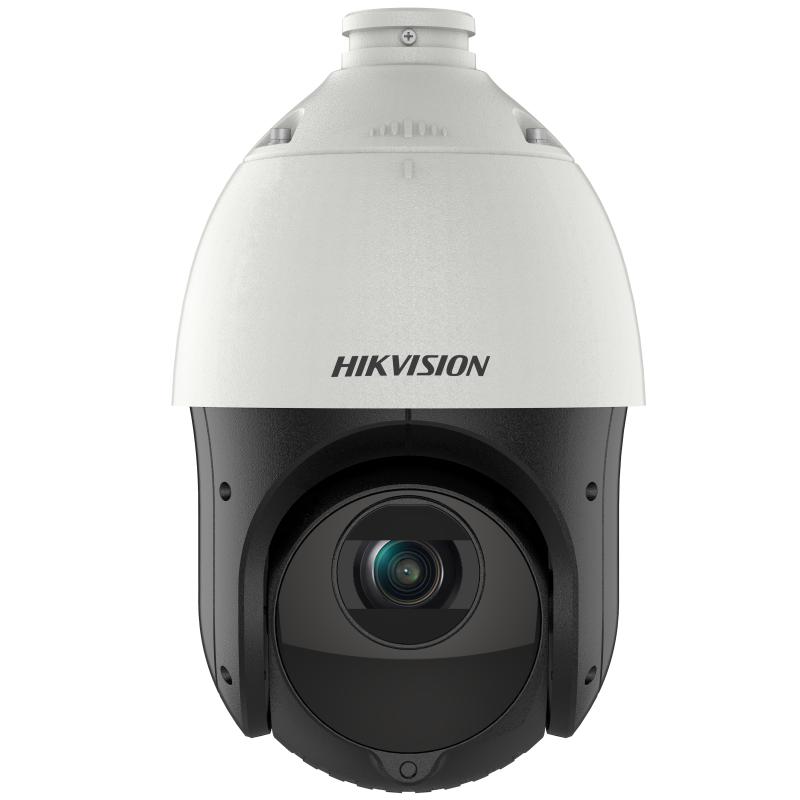
Most PTZ cameras arrive with a bill for everything around them. A heavier bracket. A power supply. A switch that can deliver more than standard PoE. By the time the moving camera is up, it has quietly reorganised the installation.
This one is the exception, and that is why it is the most commonly fitted speed dome Hikvision makes. Two kilograms, 164 mm across, standard 802.3at PoE, eighteen watts including the heater and the infrared. It goes where a fixed dome would have gone, on the infrastructure a fixed dome would have used, and then it moves.
What it does with that: 25x optical zoom from 4.8 to 120 mm, narrowing the view from 55 degrees to 2.4. A hundred metres of infrared. Three hundred presets, eight patrol routes, and 3D positioning, so an operator drags a box on the live view and the camera goes there. AcuSense underneath means the perimeter rules only fire for people and vehicles, not for the hedge.
- 25x optical zoom, 4.8–120 mm, 55° down to 2.4° horizontal
- 4 MP, 2560 × 1440 on a 1/2.8″ sensor, 120 dB WDR
- Infrared to 100 m, with digital defog and demisting
- 360° pan, -15° to 90° tilt with auto flip, up to 80°/s
- 300 presets, 8 patrols, 4 pattern scans, 3D positioning
- AcuSense perimeter rules triggered by people and vehicles only
- Standard PoE 802.3at, max 18 W including heater and IR
- 2 kg, IP66, 6000 V surge protection, -30 °C to 65 °C
Why there is no coverage diagram on this page
Every fixed camera in this catalogue carries an interactive diagram showing exactly what it covers. This one does not, and the reason is worth stating rather than hiding.
A camera that pans a full circle and zooms twenty-five times does not have a field of view. It has a field of view at this instant, pointed wherever the last operator or the last patrol route left it. Drawing one wedge would suggest a fixed coverage that does not exist. Hikvision also does not publish DORI figures for this model, and calculating them ourselves would produce numbers that are not comparable with the manufacturer figures used everywhere else here.
The honest version: at the wide end this sees about as much as a standard dome, and at full zoom it can pick a face out of a car park — but which of those is true at any given second depends entirely on how it is being driven. If coverage certainty matters more than reach, a fixed camera is the better instrument, and the diagrams on those pages will tell you exactly what you get.
Full specification
Imaging and lens
| Image sensor | 1/2.8″ progressive scan CMOS |
| Max. resolution | 2560 × 1440 |
| Min. illumination | Colour 0.005 lux; B/W 0.001 lux (F1.6, AGC on); 0 lux with IR |
| Shutter speed | 1 s to 1/30,000 s, slow shutter supported |
| Zoom | 25x optical, 16x digital; approx. 3.6 s wide to tele |
| Focal length | 4.8 mm to 120 mm |
| Field of view | Horizontal 55° to 2.4°; vertical 33° to 1.4°; diagonal 61.5° to 2.8° |
| Focus | Auto, semi-auto, manual |
| Aperture | Max. F1.6 |
| Supplement light | Infrared up to 100 m |
| WDR | 120 dB |
| SNR | > 52 dB |
| Image enhancement | BLC, HLC, 3D DNR, digital defog, EIS, regional focus and exposure |
| Privacy mask | 24 programmable polygon masks |
Pan, tilt and zoom control
| Pan range | 360° continuous |
| Tilt range | -15° to 90° with auto flip |
| Pan speed | Configurable 0.1° to 80°/s; preset speed 80°/s |
| Tilt speed | Configurable 0.1° to 80°/s; preset speed 80°/s |
| Proportional pan | Yes — movement slows as the lens zooms in |
| Presets | 300, with preset freezing |
| Patrol scan | 8 patrols, up to 32 presets each |
| Pattern scan | 4 recorded patterns |
| Park action | Preset, pattern, patrol, auto scan, tilt scan, random scan, frame scan, panorama scan |
| 3D positioning | Yes |
| Power-off memory | Yes |
Video, audio and network
| Main stream | 50 Hz: 25 fps; 60 Hz: 30 fps (2560×1440, 1920×1080, 1280×960, 1280×720) |
| Sub-stream | 50 Hz: 25 fps (704×576, 640×480, 352×288) |
| Third stream | 50 Hz: 25 fps; 60 Hz: 30 fps (1920×1080 downwards) |
| Video compression | Main: H.265+/H.265/H.264+/H.264; sub and third: H.265/H.264/MJPEG |
| Video bit rate | 32 kbps to 16,384 kbps |
| ROI | 8 fixed regions per stream |
| Audio | G.711/G.722.1/G.726/MP2L2/PCM; 8 to 48 kHz; noise filtering |
| Protocols | IPv4/IPv6, HTTP, HTTPS, 802.1x, QoS, FTP, SMTP, UPnP, SNMP, DNS, DDNS, NTP, RTSP, RTCP, RTP, TCP/IP |
| API | ONVIF v19.12 (Profile S/G/T), ISAPI, SDK, ISUP |
| Simultaneous live view | Up to 20 channels |
| Users | Up to 32, three levels |
| Client | iVMS-4200, HikCentral Pro, Hik-Connect |
| Ethernet | 1 RJ45 10M/100M |
| Storage | microSD/SDHC/SDXC up to 256 GB; NAS (NFS, SMB/CIFS), ANR |
| Audio interfaces | 1 line in, 1 line out |
| Alarm | 1 input, 1 output |
Analytics and events
| Basic event | Motion detection, video tampering, exception, alarm I/O |
| Smart event | Line crossing, intrusion, region entrance and exit detection |
| Face capture | Up to 5 faces simultaneously, with grading and best-picture selection |
| Perimeter protection | Line crossing, intrusion, region entrance and exit, triggered by human and vehicle |
Power, housing and approvals
| Power | 12 VDC, max. 18 W including 1.6 W heater and 9 W IR; PoE 802.3at |
| Material | ADC12 alloy |
| Dimensions | Ø164.5 mm × 290 mm |
| Weight | Approx. 2 kg |
| Operating conditions | -30 °C to 65 °C, humidity ≤ 90%; demisting fitted |
| Protection | IP66, TVS 6000 V lightning protection, surge protection |
Also listed as DS-2DE4425IW-DE and DS-2DE4425IW-DE(T5). Related models with other zoom and resolution combinations sit in the DS-2DE44xx and DS-2DE46xx ranges. For a heavier speed dome with 400 m infrared and auto-tracking, see the DS-2DF8225IX-AELW. Specification sourced from the manufacturer product page.
Works with SmartGard.AI
A PTZ has a problem no fixed camera has: it is usually pointing somewhere else. Three hundred presets and eight patrol routes are only useful if something tells the camera when to stop patrolling and start paying attention, and traditionally that something is a person watching a wall of monitors.
The system needs one thing from a camera: the ability to report that something happened. This one reports motion, tampering, line crossing, intrusion, region entry and exit, and face captures, all with AcuSense filtering so the trigger is a person or a vehicle rather than weather. SmartGard.AI reads the frame those triggers arrive with, judges it against zone rules written in your own words, and raises an alarm only when the answer is yes.
Worth knowing if you write zone rules for a moving camera: a zone drawn against one preset does not mean anything at a different preset. Tie rules to the presets that matter and leave the rest of the tour to recording.
Already have cameras up? The same layer retrofits onto most modern IP installations without replacing what you already own.